Support faster follow-up
SOS and fall alerts can help staff identify when a client may need attention. Response times depend on your coverage, staffing and procedures.

For providers and care teams
Explore ytals for aged care, NDIS, home care and retirement villages.
Bring watch alerts and information into your existing care processes, with your staff and agreed contacts responsible for responding.
Request a pilotSOS and fall alerts can help staff identify when a client may need attention. Response times depend on your coverage, staffing and procedures.
Location and geo-fence alerts can support conversations about safety and appropriate follow-up.
Help clients stay connected to chosen contacts while continuing their everyday routines.
Use watch information alongside care plans, professional judgement and established response arrangements.
View multiple watches in one place. Review SOS, fall and location history, manage watch access, and view wellness indicator history for heart rate, SpO2, blood pressure and temperature.
ytals is not a medical device and does not replace medical advice or emergency services.
The dashboard supports your team’s existing work. It does not replace staff supervision, clinical assessment or emergency services.
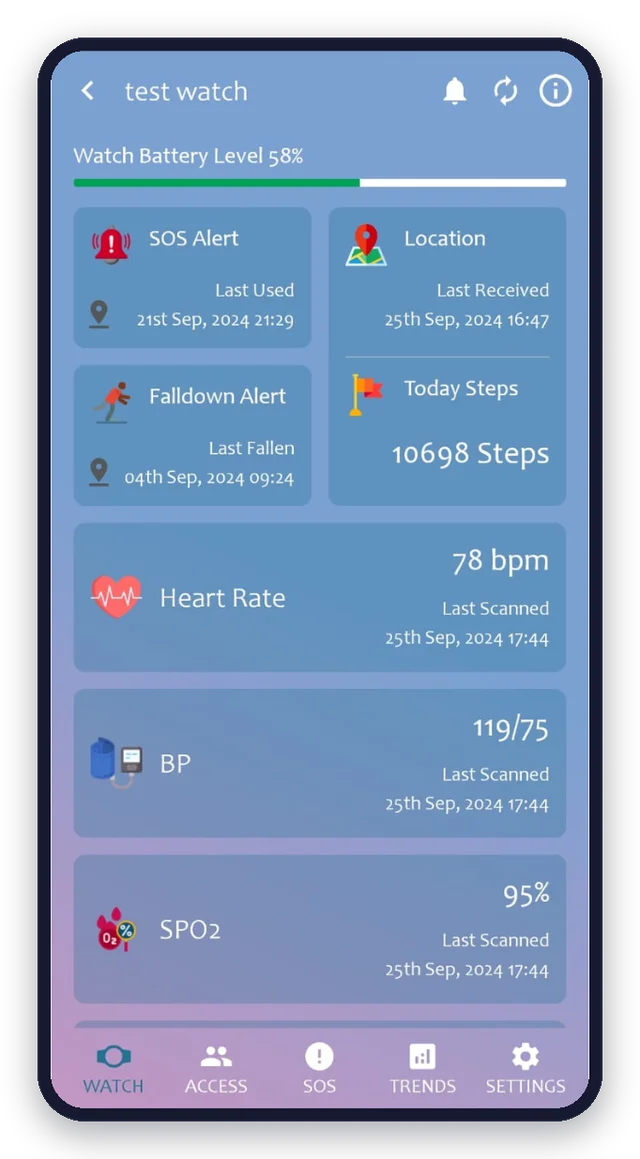
Alerts and location depend on coverage and charged devices. Fall detection may not detect every fall; no response outcome is guaranteed.
No large upfront commitment, easy setup, and an opportunity to evaluate in real conditions. We’ll discuss your clients, staff workflow, coverage and response arrangements before you begin.